
Walk onto any factory floor, substation, or water treatment plant, and you’ll notice something quickly: the network never gets a day off. Machines talk to controllers every few milliseconds. Sensors stream data around the clock. A five-second network drop that would barely register in an office can stop a production line, trip a safety system, or cost a plant thousands of dollars in scrap material.
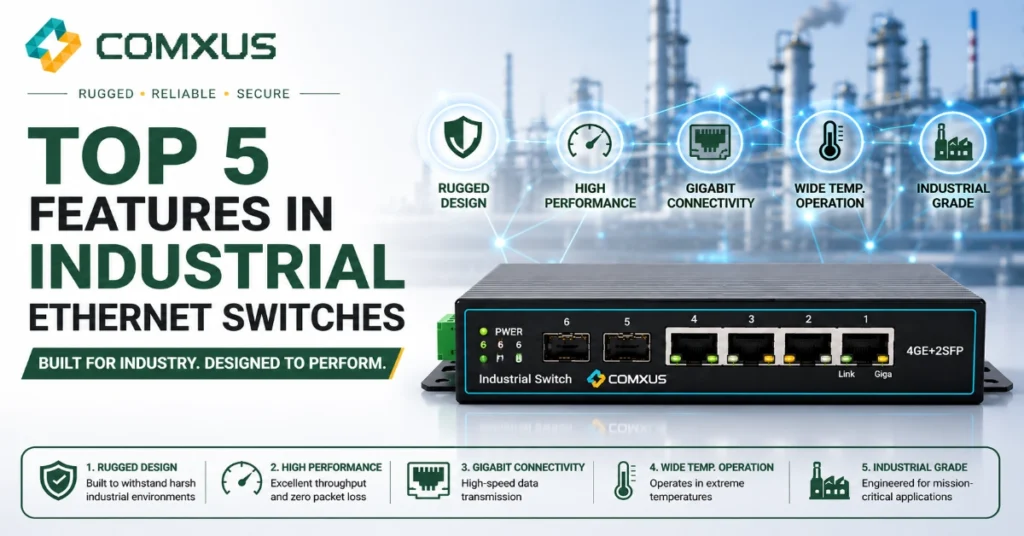
This is exactly why a standard commercial Ethernet switch the kind you’d find in an office server room usually fails in an industrial setting. Commercial switches are built for climate-controlled rooms, light vibration and predictable traffic. Industrial environments offer none of that.
Heat from furnaces, vibration from heavy machinery, dust, humidity and electromagnetic interference from motors and drives all attack networking equipment daily. Add in the rapid growth of Industry 4.0, Industrial IoT (IIoT), and smart manufacturing, and plants now depend on their network as much as they depend on power. According to a 2026 industrial communication survey by HMS Networks, Industrial Ethernet now accounts for 79% of all new industrial networking node installations worldwide, up from 76% the previous year and a sharp rise from just 34% when tracking began in 2015. That shift shows how central Ethernet-based networking has become to modern automation.
Manufacturing plants use industrial switches to keep robotic assembly lines synchronised. Substations use them to relay protection signals in milliseconds. Warehouses use them to run conveyor systems and automated guided vehicles. Oil and gas facilities use them in explosive, high-vibration zones. Transportation systems and smart cities use them to keep traffic signals, surveillance, and public transit networks running without interruption.
This guide breaks down the five features that matter most when choosing an industrial Ethernet switch, along with the supporting features, comparisons, and buying advice engineers actually need before making a purchase decision.
What Is an Industrial Ethernet Switch?
An industrial Ethernet switch is a networking device built to connect machines, controllers, sensors, and IT systems in harsh operating environments where temperature extremes, vibration, dust, and electrical noise would damage a standard commercial switch.
Unlike office-grade switches, industrial Ethernet switches use hardened components, wider temperature tolerances, and rugged enclosures. They’re designed to run continuously for years without a technician needing to open a climate-controlled cabinet to service them.
You’ll typically find industrial Ethernet switches inside:
- Factory control panels and DIN rail enclosures
- Substation relay rooms
- Outdoor traffic cabinets
- Oil and gas skid packages
- Warehouse automation racks
- Water and wastewater treatment control rooms
Industries need this specialised equipment because unplanned downtime in these environments doesn’t just cost money; it can create safety hazards, regulatory violations, and product quality failures that ripple through an entire operation.
Why Features Matter More Than Price
It’s tempting to compare industrial switches purely on upfront cost. But the switch itself is rarely the biggest expense over its lifetime. Total Cost of Ownership (TCO) tells a more complete story.
A cheaper switch with weak environmental protection may fail within two or three years, forcing an unplanned replacement, a production stoppage, and an emergency service call, all of which cost far more than the price difference between a budget switch and a properly rated one.
Features directly affect:
- Reliability: Fewer failures mean fewer unplanned outages.
- Uptime: Redundancy protocols keep traffic flowing even during a fault.
- Expansion capability: Extra ports and routing options support future growth without a forklift upgrade.
- Cybersecurity: Managed features let you segment and monitor OT traffic.
- Maintenance savings: Remote diagnostics reduce the need for on-site visits.
In short, the right feature set protects your production line, not just your budget.
Top 5 Features in Industrial Ethernet Switches
1. Rugged Industrial Design
Rugged design means a switch is built with a wide operating temperature range, fanless cooling, a metal housing, and vibration/shock resistance so it survives conditions that would damage standard networking gear.
This is the foundation everything else builds on. If a switch can’t survive its physical environment, none of its other features matters.
Look for:
- Wide operating temperature: Many industrial switches operate from -40°C to 75°C, covering everything from outdoor winter installations to hot equipment rooms.
- Fanless cooling: No moving fan parts means no dust buildup and no mechanical failure point.
- Metal housing: Protects internal components from impact, moisture, and EMI.
- DIN Rail mounting: Fits directly into standard industrial control cabinets.
- Vibration and shock resistance: Critical for switches mounted near motors, presses, or on moving vehicles like trains and cranes.
- EMI/EMC protection: Shields the switch from electrical noise generated by variable frequency drives and heavy machinery.
- IP ratings: For switches installed outdoors or in wash-down areas, an IP30, IP40, or higher rating protects against dust and water ingress.
Practical example: A switch mounted next to a stamping press in an automotive plant faces constant vibration and electrical noise from the press motor. A commercial switch would likely fail within months. A ruggedised industrial switch, rated for continuous vibration and wide temperature swings, is built specifically to handle that environment for years.
2. Managed Networking Features
Managed networking features give engineers the ability to configure, monitor, and secure traffic on the switch instead of simply passing data through blindly, as an unmanaged switch does.
For any network larger than a handful of devices, management capability quickly becomes essential. Key managed features include:
- VLAN (Virtual LAN): Segments traffic so, for example, SCADA traffic stays separate from general IT traffic.
- QoS (Quality of Service): Prioritises time-sensitive control traffic over less urgent data.
- Port Mirroring: Copies traffic to a monitoring port for troubleshooting and diagnostics.
- SNMP: Allows remote monitoring of switch health and performance.
- IGMP Snooping: Optimises multicast traffic, common in video surveillance and SCADA systems.
- Link Aggregation: Combines multiple physical links into one logical connection for more bandwidth and redundancy.
- Loop Prevention: Stops broadcast storms that can crash an entire network.
- Port Security: Restricts which devices can connect to specific ports, reducing unauthorised access risk.
A managed switch gives engineers visibility into what’s actually happening on the network, something an unmanaged switch simply cannot provide. When something goes wrong at 2 a.m., that visibility is the difference between a five-minute fix and a six-hour outage.
3. Redundancy and Network Reliability
Redundancy protocols such as RSTP and ERPS let a network automatically reroute traffic around a broken link or failed switch, often within milliseconds, so operations continue without interruption.
Mission-critical networks, such as substation protection systems or SCADA networks controlling a water treatment plant, cannot tolerate a single point of failure. Redundancy protocols solve this by building in backup paths.
Common redundancy technologies include:
- STP/RSTP (Spanning Tree / Rapid Spanning Tree Protocol): Prevents network loops while allowing backup paths to activate automatically.
- ERPS (Ethernet Ring Protection Switching): Designed specifically for ring topologies common in industrial networks, offering fast recovery times.
- Ring topology: Physically connects switches in a loop so traffic can flow in either direction if one link fails.
- Failover: Automatic switching to a backup path with minimal or zero data loss.
Why it matters: In a substation, a broken fibre link during a fault event could delay a protection signal by seconds long enough to damage equipment or endanger personnel. A properly configured ring network with ERPS can detect the fault and reroute traffic in well under 50 milliseconds, keeping the protection system online without anyone noticing an interruption.
4. Industrial PoE Capability
Power over Ethernet (PoE) lets a single cable deliver both data and electrical power to a device, eliminating the need for separate power wiring to cameras, access points, and other edge equipment.
Industrial PoE switches simplify installation significantly, especially in locations where running separate power lines is expensive or impractical.
Common PoE-powered devices in industrial settings:
- CCTV and industrial cameras.
- Wireless access points.
- IP phones for plant communication.
- Access control readers and door locks.
- Edge computing devices and sensors.
PoE vs. Non-PoE Industrial Switches
| Feature | PoE Switch | Non-PoE Switch |
|---|---|---|
| Cabling required | Single Ethernet cable (data + power) | Separate power and data cabling |
| Installation cost | Lower (fewer cable runs) | Higher (more labour and materials) |
| Device compatibility | Cameras, APs, IP phones, sensors | Devices with their own power supply |
| Ideal use case | Surveillance, wireless coverage, access control | Core switching, server connections, PLCs with local power |
| Power budget planning | Required (total wattage across ports) | Not applicable |
When selecting a PoE switch, always confirm the total power budget matches your connected device count. Underestimating PoE wattage is one of the most common mistakes engineers make during network design; more on that later.
5. High-Speed Fibre Connectivity
Fibre connectivity through SFP ports extends network reach beyond the 100-meter limit of copper Ethernet, resists electromagnetic interference, and supports the bandwidth needed for backbone and SCADA communication.
As plants grow larger and automation systems generate more data, copper cabling starts to hit its limits both in distance and in noise immunity. Fibre solves both problems.
Key considerations:
- SFP Ports: Allow flexible fibre module selection (multimode for shorter runs, single-mode for longer distances).
- Gigabit Ethernet: Standard bandwidth for most modern industrial applications.
- 10G Uplinks: Increasingly common for backbone connections aggregating traffic from multiple switches.
- Long-distance communication: Single-mode fibre can carry signals tens of kilometres, ideal for connecting remote substations or spread-out facilities.
- EMI immunity: Fibre is completely immune to electromagnetic interference, making it the right choice near high-voltage equipment or large motors.
- Backbone networking: Fibre uplinks between switches create a fast, reliable spine for the entire plant network.
- SCADA communication: Long-distance fibre links are standard for connecting remote SCADA sites like pump stations or pipeline monitoring points.
Where fibre becomes essential: Any connection running near high-voltage switchgear, spanning more than 100 meters, or linking geographically separated sites (like connecting a substation to a control centre) should use fibre rather than copper.
Additional Features Worth Considering
Beyond the top five, several supporting features round out a well-specified industrial switch:
- Layer 2 switching: Handles traffic within a local network segment; sufficient for smaller, flat networks.
- Layer 3 routing: Routes traffic between different subnets or VLANs, useful for larger, segmented plant networks.
- ACL (Access Control Lists): Restricts traffic based on defined security rules.
- Static and Dynamic Routing: Static routing works well for simple, predictable paths; dynamic routing (like OSPF) adapts automatically in larger networks.
- DHCP: Automatically assigns IP addresses to connected devices.
- IPv6 support: Future-proofs the network as IPv6 adoption grows.
- Web and CLI Management: Gives engineers flexible ways to configure the switch, whether through a browser interface or command line.
- Cloud Monitoring: Allows remote visibility into switch health across multiple sites.
- Cybersecurity features: Including 802.1X authentication and encrypted management access.
- Industrial protocol support: Modbus TCP, PROFINET, and EtherNet/IP compatibility ensures the switch integrates cleanly with existing automation systems.
Managed vs. Unmanaged Industrial Ethernet Switches
| Criteria | Managed Switch | Unmanaged Switch |
|---|---|---|
| Configuration | Fully configurable (VLAN, QoS, security) | Plug-and-play, no configuration |
| Security | Port security, ACLs, authentication | Minimal to none |
| Scalability | Built for growing, segmented networks | Best for small, fixed setups |
| VLAN Support | Yes | No |
| Routing | Layer 2 and Layer 3 options available | Layer 2 only, no routing |
| Cost | Higher upfront cost | Lower upfront cost |
| Applications | SCADA, automation networks, multi-zone plants | Small machine cells, point-to-point links |
| Maintenance | Remote diagnostics reduce site visits | Requires physical inspection to troubleshoot |
| Best Use Case | Facility-wide or mission-critical networks | Small, isolated device groups |
For most industrial facilities beyond a small machine cell, a managed industrial Ethernet switch delivers enough long-term value in visibility and reliability to justify the added cost.
Real-World Applications
- Manufacturing Plants: Rugged design and managed VLANs keep production-line traffic isolated from office IT traffic, reducing congestion and improving determinism for robotics and PLCs.
- Warehouse Automation: PoE powers wireless access points that keep AGVs and handheld scanners connected as they move throughout the facility.
- Oil & Gas: Wide temperature ratings and vibration resistance matter most here, since equipment often sits in remote, extreme-environment locations with limited maintenance access.
- Renewable Energy: Fibre connectivity links wind farms or solar arrays spread across large areas back to a central monitoring point.
- Smart Cities: Redundant ring topologies keep traffic signal networks and public safety cameras online, even if one fibre run is damaged during roadwork.
- Transportation: Shock and vibration resistance are non-negotiable for switches installed on trains, in tunnels, or in trackside cabinets.
- Building Automation: Managed switches with VLAN segmentation separate HVAC, lighting, and security systems on one shared network backbone.
- Water Treatment: Redundancy protocols like ERPS keep SCADA communication active even if a single fibre link fails, which is critical for maintaining continuous monitoring of treatment processes.
- Mining: Rugged, IP-rated switches survive dust, moisture, and constant vibration from heavy equipment operating underground or in open pits.
- Utility Networks: High-speed fibre uplinks and Layer 3 routing support substation automation and grid monitoring across wide geographic areas.
Common Mistakes When Choosing an Industrial Ethernet Switch
- Choosing unmanaged when management is needed: A growing network with multiple systems almost always benefits from VLAN segmentation and monitoring.
- Ignoring environmental ratings: A switch rated for office use won’t survive a hot, dusty control cabinet.
- Buying without fibre ports: Even if fibre isn’t needed today, having SFP ports available avoids a costly replacement later.
- Underestimating future expansion: Choosing a switch with just enough ports for today’s needs often means another purchase within a year or two.
- Ignoring redundancy protocols: Without RSTP or ERPS, a single cable fault can take down the whole network.
- Selecting the wrong PoE budget: Adding cameras or access points without checking total wattage can leave devices underpowered.
- Ignoring Layer 3 requirements: Larger, segmented networks need routing capability that Layer 2-only switches can’t provide.
- Focusing only on price: The cheapest switch often becomes the most expensive one once downtime and early replacement are factored in.
Practical recommendation: Map out your network’s needs for the next five years, not just today, before finalising a switch selection.
How to Choose the Right Industrial Ethernet Switch
Follow these steps to narrow down the right switch for your application:
- Count your ports: Include current devices plus a buffer for future expansion.
- Decide Layer 2 vs. Layer 3: Small, flat networks work fine with Layer 2. Larger, segmented networks need Layer 3 routing.
- Calculate PoE requirements: Add up the wattage of every PoE device you plan to connect.
- Check fibre uplink needs: Any connection over 100 meters or near high-EMI equipment should use fibre.
- Redundancy plan: If the application is mission-critical, budget for ring topology support (RSTP/ERPS).
- List required management features: VLAN, QoS, and SNMP are common baseline requirements for industrial networks.
- Confirm industrial certifications: Look for ratings appropriate to your industry (rail, marine, hazardous locations, etc.).
- Match environmental conditions: Check the switch’s temperature range, IP rating, and vibration tolerance against your installation site.
- Plan for scalability: Choose a switch family that offers a clear upgrade path as your network grows.
- Set a realistic budget: Compare based on total cost of ownership, not just the sticker price.
Manufacturers such as Comxus design industrial Ethernet switches across Layer 2 and Layer 3 categories, with both PoE and non-PoE options, giving engineers a range of choices to match these exact selection criteria for automation, SCADA, and mission-critical networking projects.
Conclusion
A reliable industrial network comes down to five essential features: rugged hardware built for harsh conditions, managed networking capability for visibility and control, redundancy protocols that eliminate single points of failure, PoE capability that simplifies powering edge devices, and high-speed fibre connectivity for distance and noise immunity.
Getting this combination right doesn’t just prevent downtime; it builds a network that scales as automation needs grow, supports Industry 4.0 initiatives, and protects the operational systems that plants, utilities, and infrastructure depend on every day.
Organisations evaluating their next industrial networking upgrade can explore the Comxus product portfolio to compare Layer 2, Layer 3, PoE, and non-PoE industrial Ethernet switches suited to different automation and mission-critical applications.
Read Also: Industrial Network Security Secrets No One Talks About
Read Also: Common Reasons Behind Industrial Network Failure In India?
