
In an Ethernet network, not every switch port performs the same role. Some ports connect end devices such as IP cameras, PLCs, computers and access-control systems, while others connect one network switch to another or connect an access switch to the core network.
These connections are commonly described as downlinks and uplinks.
Understanding the difference is important when designing an enterprise or industrial networks because the wrong uplink capacity can create a bottleneck even when individual device ports have sufficient bandwidth.
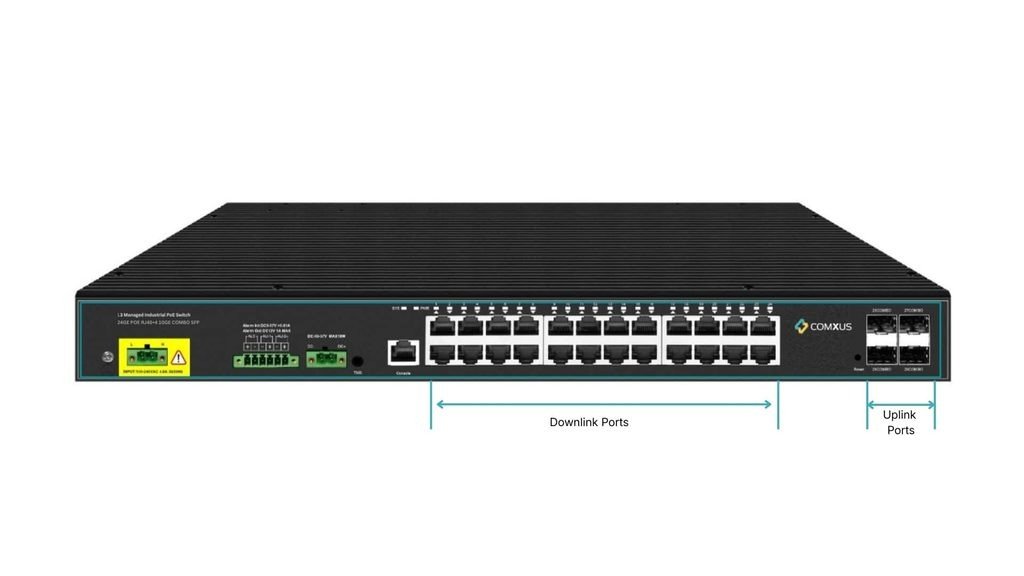
What Is a Downlink Port?
A downlink port is a network interface used to connect an upstream network device to an endpoint or lower-level network device.
In a typical access switch, downlink ports may connect:
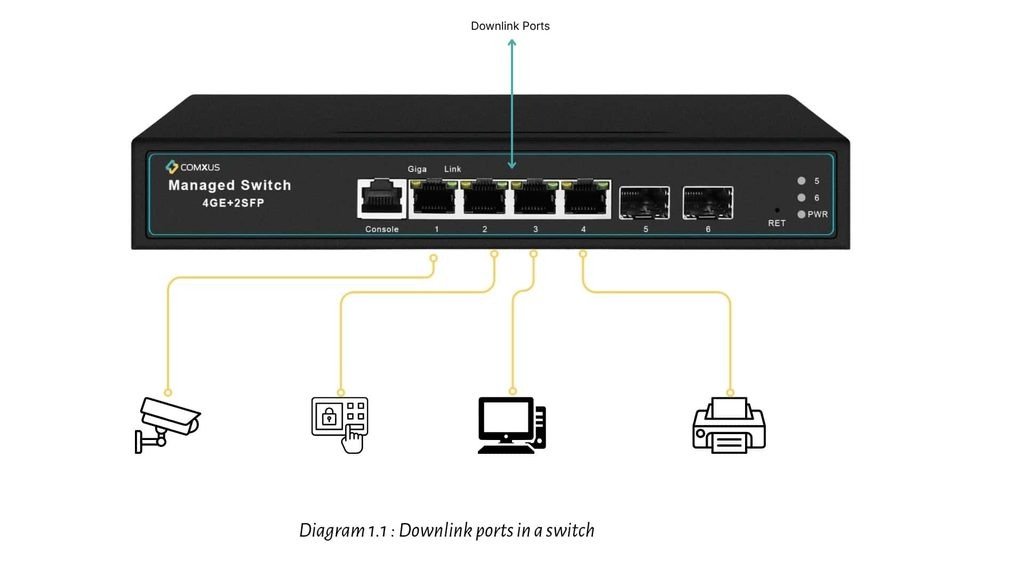
- IP cameras
- PLCs
- SCADA systems
- HMIs or other devices.
The term “downlink” describes the direction in the network hierarchy. The switch is receiving connectivity from the higher-level network and providing connectivity toward connected devices.
In practical deployments, the physical port itself may simply be labelled Ethernet, RJ45, PoE, or SFP rather than explicitly marked “downlink.”
What Is an Uplink Port?
An uplink port is a network interface used to connect a switch or access device toward a higher-level network device.
An uplink can connect:
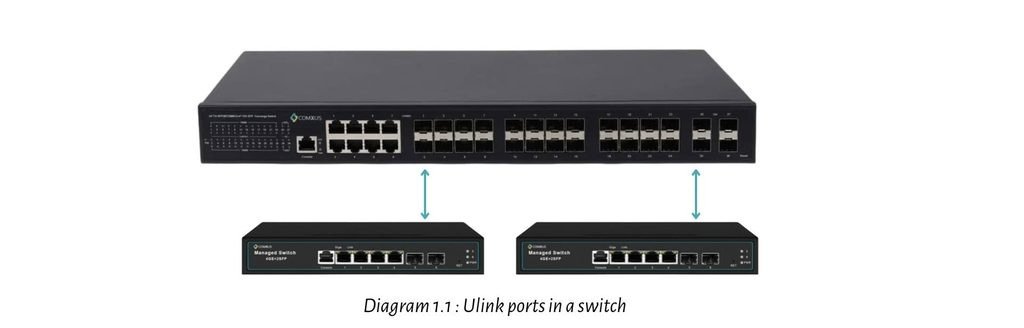
- Access switch to distribution switch
- Distribution switch to core switch
- Switch to router
- Switch to firewall
- Remote switch to a data-center network
Uplink ports are often available as SFP, SFP+, SFP28 or other fiber/copper interfaces, depending on the switch.
Uplink vs Downlink: What Is the Difference?
The easiest way to understand the difference is to look at the network hierarchy.
| Feature | Downlink | Uplink |
| Primary purpose | Connect endpoints | Connect toward higher network layer |
| Typical device | Camera, PLC, PC | Switch, router, core switch |
| Common interface | RJ45 / PoE | SFP/SFP+/fiber/copper |
| Typical speed | 100M/1G | 1G/10G/25G+ |
| Traffic pattern | Individual device traffic | Aggregated traffic |
| Example | Camera → Switch | Switch → Core |
These are general design patterns, not strict physical-port rules. A network engineer can use available interfaces differently depending on the architecture.
Why Are Uplink Ports Important?
Consider an industrial facility with 24 IP cameras.
Suppose each camera produces approximately 8 Mbps of traffic.
The aggregate traffic is:
24 × 8 Mbps = 192 Mbps
If these cameras connect to a switch with a 1 Gbps uplink, there is sufficient nominal capacity for this example’s camera traffic, while other traffic and future expansion still need to be considered.
Now imagine several switches feeding the same uplink:
The uplink can become a bottleneck because traffic from multiple switches is aggregated onto one physical connection.
This is why uplink bandwidth should be calculated based on the expected aggregate traffic, not just the speed of individual access ports.
Uplink Ports and VLANs:
An uplink can also operate as a trunk link when multiple VLANs need to travel between switches.
The uplink can therefore carry traffic from several logical networks over one physical connection.
This is particularly useful when an industrial switch needs to transport CCTV, SCADA/PLC, access-control and management traffic toward a core network.
What Is the Difference Between Uplink Speed and Port Speed?
A switch may have:
24 × 1G RJ45 ports + 4 × 10G SFP+ uplinks
The 1G ports can connect individual devices, while the 10G interfaces provide higher-capacity connections toward the network core.
This design allows multiple access ports to feed a faster aggregation link.
However, engineers should also check the switch’s switching capacity and forwarding rate, because simply having 10G ports does not automatically guarantee that every traffic pattern can be handled at full line rate.
FAQ’s Related to Uplink and Downlink Port:
Is an uplink port faster than a downlink port?
Not always, but uplinks are commonly designed with higher bandwidth because they carry aggregated traffic from multiple devices.
Can an uplink carry multiple VLANs?
Yes. When configured as a trunk, an uplink can carry multiple VLANs using IEEE 802.1Q tagging.
Are SFP ports always uplink ports?
No. SFP ports are commonly used for uplinks, but their actual role depends on the switch design and network configuration.
Conclusion-
Uplink and downlink ports describe the direction and role of network connections within a network hierarchy.
Downlinks generally connect switches to endpoint devices, while uplinks connect switches toward higher-level network infrastructure.
