
A Link That Should Work, but Doesn’t
A technician finishes a new fibre run between two switches in a server room. The connectors click into place. The cable shows no kinks or damage. Both ports look right. Yet the link light stays dark.
Many people replace the transceiver first, then the switch port, then the cable. Sometimes one of those fixes the problem. Sometimes none of them does, because the fault is in the path the light takes, not in any single component.
One possible cause is incorrect fibre polarity. It does not explain every failed link, but it is easy to overlook.
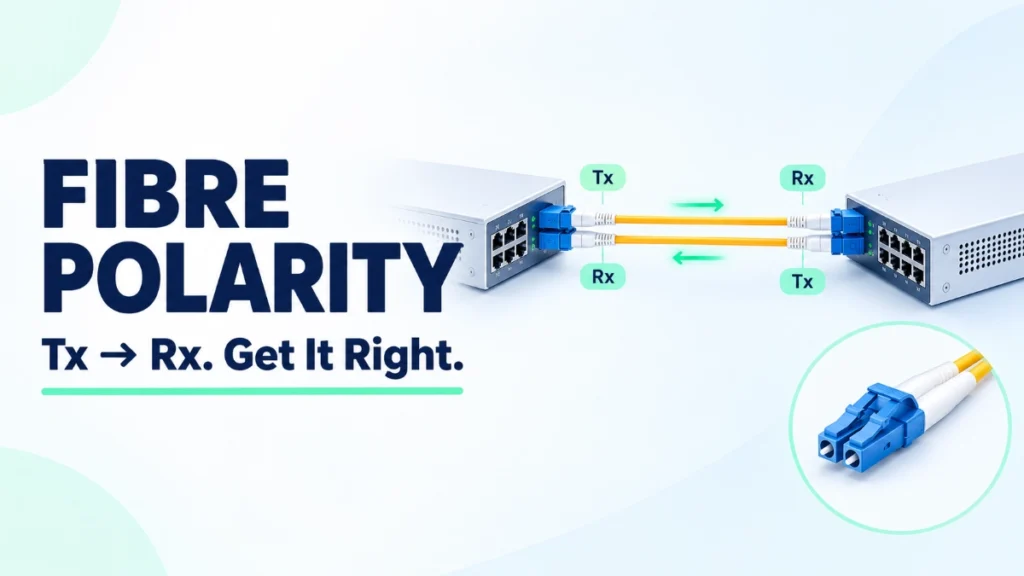
Think of a phone call. Your voice must reach the other person’s ear, and their reply must reach yours. If you both speak into the same earpiece, nobody hears anything. Fibre links work the same way: each device’s transmit path must connect to the other device’s receive path.
So what is fibre polarity, how does it work, and why should you check it when you install or troubleshoot a fibre optic network? This guide answers those questions step by step.
What Is Fibre Polarity?
Fibre polarity describes how the transmit and receive paths line up between connected devices. In a typical duplex link, one fibre strand carries light in one direction and a second strand carries light in the opposite direction.
Correct polarity means the transmitting side of one device connects to the receiving side of the other, and vice versa for the return path.
Take two switches. Switch A sends light out of its transmit port. That light must arrive at the receive port on Switch B. Switch B then sends its own signal back, and it must land on Switch A’s receive port.
Polarity concerns the orientation and mapping of the optical paths. It has nothing to do with the direction of electric current, and the colour of the cable jacket does not define it.
Correct polarity supports the intended communication path, but it does not guarantee a working link. A link can still fail because of:
- Incompatible optics
- Dirty or contaminated connectors
- Damaged fibre
- Configuration issues
- Excessive optical loss (the signal weakening along the path)
Why Fibre Polarity Matters in Network Connections
Polarity looks like a small detail, but it affects the whole installation. Getting it right helps you:
- Establish the intended transmit-to-receive path between devices.
- Support reliable connections between switches, servers, and other equipment.
- Avoid unnecessary troubleshooting and installation delays.
- Keep fibre mapping consistent across patch panels and structured cabling.
- Reduce errors during moves, adds, and changes.
Here is a data centre example. A technician moves a server connection to a different rack. The new route runs through another patch panel with a different patching arrangement. The cables are all good, but the end-to-end mapping has changed, and the link no longer behaves as expected.
Polarity matters in maintenance as much as in new builds. A cable that worked in one arrangement may fail in another if the end-to-end mapping changes.
Be careful about what incorrect polarity actually does. It does not always stop every optical link from coming up. The outcome depends on the optics, the fibre arrangement, and the connection design. That is why you should treat polarity as something to verify, not something to assume.
How Transmit (Tx) and Receive (Rx) Work
Two terms appear throughout fibre work:
- Tx (transmit): the optical interface sends data.
- Rx (receive): the optical interface receives data.
In a typical duplex connection between two switches, the paths run like this:
Switch A Tx → Switch B Rx
Switch A Rx ← Switch B Tx
Each device sends on one strand and listens on another. Separate strands let both devices transmit and receive at the same time.
This example applies to a typical duplex optical link. Some optical technologies use a single fibre and carry traffic in both directions on different wavelengths (colours of light). Do not assume every fibre link uses two strands.
Before you change any fibre connection, verify the transceiver type, the connector arrangement, and the equipment documentation. The documentation tells you what the link expects, so you do not have to guess.
What Are the Main Fibre Polarity Types?
When people talk about polarity types, they usually mean the Type A, Type B, and Type C methods used in structured multi-fibre cabling built on MPO/MTP connectors. These connectors hold several fibres, commonly 12 or more, in one housing. The methods describe how fibre positions map from one end of a link to the other.
- Type A uses straight-through mapping. Fibre position 1 at one end connects to position 1 at the other end, and so on.
- Type B uses reversed mapping. The fibre positions flip between ends, so position 1 connects to the last position.
- Type C uses pair-reversed mapping. Adjacent fibre pairs swap positions, so position 1 connects to position 2, and position 2 to position 1.
| Type | General mapping behaviour | Key planning consideration |
|---|---|---|
| Type A | Straight through: positions match end to end | Needs other components in the link, such as patch cords, to create the correct Tx-to-Rx crossover |
| Type B | Reversed: positions flip end to end | Components at both ends must suit the reversed arrangement |
| Type C | Adjacent pairs swap positions | Pair-based mapping must match the duplex or parallel interface in use |
These terms refer to structured multi-fibre cabling methods. They are not three universal arrangements for every duplex patch cable.
No type is universally best. The right method depends on the end-to-end system design, the connector types, the equipment interfaces, and the cabling components. You cannot choose a method in isolation from the rest of the link.
Do not rely on colour alone to identify polarity. Follow the applicable cabling standard, the manufacturer’s documentation, and the project design.
Fibre Polarity in Duplex and MPO/MTP Cabling
Duplex LC connections
A duplex LC link commonly uses two fibre strands, one for each direction. The connector arrangement and patch-cord mapping must preserve the intended Tx-to-Rx path from end to end. Adding a patch cord or changing a panel can alter that mapping without anyone noticing.
MPO/MTP connections
An MPO/MTP connector carries many fibre positions at once. These systems often serve higher-density data centre links, including parallel optical connections and structured cabling.
That density demands careful planning. Fibre positions, trunk cables, cassette modules, patch cords, and transceiver interfaces must all work together. A mismatch at any one point can break the intended mapping for the whole link.
Not every MPO/MTP application uses the same polarity arrangement. The correct method depends on the optical interface and the end-to-end design.
The practical takeaway is simple: document the intended mapping before installation, then verify the completed link.
Common Signs of a Fibre Polarity Problem
Several symptoms might prompt a polarity check:
- A fibre link does not establish after installation or repatching.
- A connection stops working after a patch-cord change.
- The link behaves differently from the documented design.
- A multi-fibre connection does not map to the expected ports or lanes.
- Troubleshooting points to a possible Tx-to-Rx mismatch.
None of these symptoms proves a polarity problem. Dirty connectors, damaged fibre, incorrect transceivers, incompatible speeds, faulty ports, and configuration errors can all produce the same result.
Start by checking device status, transceiver compatibility, connector cleanliness, cable mapping, and optical measurements as appropriate. Do not swap fibres blindly in a live network. Follow your site’s maintenance and testing procedures.
How to Check and Troubleshoot Fibre Polarity
Work through the link in a clear order:
- Confirm the link design: Check the network diagram, the equipment documentation, and the expected transmit/receive mapping.
- Identify both ends: Trace the cable from the transmitting interface to the receiving interface, then verify the return path.
- Check the cable and connector type: Confirm that the patch cord, trunk, and adapters suit the application.
- Inspect and clean connectors safely: Follow proper fibre inspection and cleaning procedures. Never look directly into a fibre end or an optical port.
- Use suitable test equipment: Depending on the installation, a polarity tester, fibre inspection tool, optical power meter, or other appropriate equipment can help verify the link.
- Verify the completed connection: Confirm link status and compare test results with the design and the equipment requirements.
- Document the result: Update labels and cabling records after you correct any mapping issue.
A polarity test checks fibre mapping. Optical loss testing checks how much signal the link loses. They answer different questions, and you may need both.
No single test or indicator identifies every possible fibre fault, so combine checks rather than relying on one result.
Best Practices for Preventing Fibre Polarity Errors
Prevention is cheaper than troubleshooting. Build these habits into your installation process:
- Document the end-to-end fibre mapping before installation.
- Label both ends of each fibre link.
- Use compatible patch cords, trunks, cassettes, and transceivers.
- Follow the specified polarity method for the complete link.
- Verify the mapping before connecting production equipment.
- Keep connectors clean and protect unused fibre ends.
- Maintain accurate rack, patch-panel, and port records.
- Test the link after installation, repatching, or major changes.
- Train installation teams to recognise Tx/Rx and MPO/MTP mapping requirements.
Documentation becomes more valuable as a data centre grows. When several technicians handle the same cabling over months or years, clear records stop each person from working from a different assumption.
Common Mistakes to Avoid
Watch for these errors:
- Assuming a fitting connector means correct polarity: A connector that plugs in can still map to the wrong position.
- Reversing fibres without checking the intended mapping: A blind swap can fix one problem and create another.
- Treating Type A, B, and C as universal rules: They describe specific multi-fibre schemes, not every connection.
- Trusting cable colours alone: Colour does not prove the mapping.
- Ignoring connector cleanliness and optical loss: Both can break a link that has correct polarity.
- Replacing equipment before checking the cabling path: Swapping switches or transceivers costs time and money.
- Skipping documentation after troubleshooting: Undocumented fixes cause the next failure.
Polarity should be one part of a structured troubleshooting process. It does not replace checks for other possible faults.
Frequently Asked Questions
Fibre polarity describes how the transmit and receive paths line up between connected devices. Correct polarity routes each device’s transmitting side to the other device’s receiving side, so both directions of communication work as intended.
Polarity ensures the optical paths connect as designed. It supports reliable installations, reduces troubleshooting time, and keeps patching consistent during moves, adds, and changes. Other factors, such as clean connectors and compatible optics, also affect link performance.
Tx is the transmit side of an optical interface, which sends data. Rx is the receive side, which accepts data. In a typical duplex link, one device’s Tx connects to the other device’s Rx.
These are common MPO/MTP structured cabling methods. Type A maps straight through, Type B reverses fibre positions, and Type C swaps adjacent pairs. They do not apply universally to every patch cable, and the right choice depends on the whole link design.
Conclusion: Get the Fibre Mapping Right
Fibre polarity makes sure the optical transmit and receive paths connect as intended. It matters during initial installation, data centre expansion, patching changes, and troubleshooting.
Correct polarity is only one part of a reliable fibre link. Connector cleanliness, cable condition, compatible optics, correct configuration, and acceptable optical loss all count too.
Follow the cabling design, verify the mapping, test the completed link, and keep your documentation current. A dependable physical layer is the foundation every network service builds on, and it reflects Comxus’s wider focus on solid networking infrastructure.
Read Also: Data Centre Network Infrastructure Costs: What Affects the Budget?
Read Also: Ethernet vs InfiniBand for AI Data Centres
