
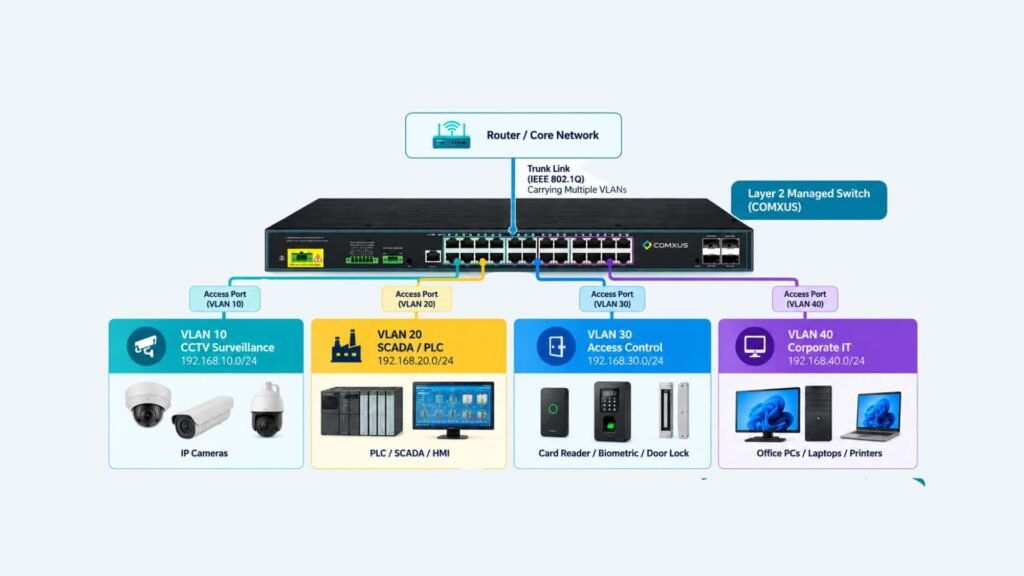
An access port is a switch port configured to carry traffic for a single VLAN. It is commonly used to connect end devices such as computers, IP cameras, PLCs, SCADA workstations, access-control controllers, printers, and other Ethernet devices to a managed network switch.
In an industrial network, access ports provide a simple way to place different devices into their designated VLAN without requiring the connected endpoint to understand VLAN tagging.
How Does an Access Port Work?
When a device sends an Ethernet frame to an access port, the switch associates that traffic with the VLAN configured on that port.
Consider a CCTV camera connected to Port 1:
If Port 1 is configured as an access port for VLAN 10, traffic entering through that port is treated as VLAN 10 traffic.
The camera itself does not normally need to add an IEEE 802.1Q VLAN tag when operating as a standard endpoint on an access port. The switch handles the VLAN association.
This makes access ports particularly useful for ordinary endpoint devices.
Access Port vs Trunk Port
The main difference between an access port and a trunk port is the number of VLANs they are designed to carry.
| Feature | Access Port | Trunk Port |
| VLANs | Usually one | Multiple |
| Typical connection | End device | Switch-to-switch/network device |
| VLAN tagging | Usually untagged toward endpoint | 802.1Q tagging commonly used |
| Example | CCTV camera | Switch uplink |
| Common use | Device connectivity | VLAN transport |
An access port connects a device to a VLAN, while a trunk allows multiple VLANs to travel between network devices.
Why Is an Access Port Important?
A properly configured access port provides several practical benefits.
1. Simple Endpoint Connectivity: Most end devices can connect without needing VLAN configuration.
2. Logical Network Segmentation: Devices can be assigned to the appropriate VLAN based on their function.
3. Easier Network Management: Engineers can document switch ports according to system and VLAN.
4. Better Industrial Network Organization: Separating CCTV, SCADA, access control, and corporate IT traffic makes the network architecture easier to understand and manage.
Frequently Asked Questions:
What is an access port?
An access port is a managed switch port configured to carry traffic for a single VLAN, typically connecting an endpoint device such as a PC, IP camera, PLC, or access-control controller.
Does an access port use VLAN tagging?
Traffic presented to a normal endpoint through an access port is generally untagged. The switch internally associates the traffic with the configured VLAN.
Can a CCTV camera connect to an access port?
Yes. An IP camera can be connected to an access port assigned to the CCTV VLAN.
Can a PLC use an access port?
Yes. A PLC Ethernet interface can be connected to an access port assigned to the appropriate industrial or SCADA VLAN.
Is an access port better than a trunk port?
They serve different purposes. An access port is generally used for endpoint devices, while a trunk is generally used to carry multiple VLANs between network infrastructure devices.
Conclusion:
An access port is a fundamental component of VLAN-based Ethernet networking. It provides a straightforward method of connecting an endpoint to a specific logical network while keeping the physical switching infrastructure shared.
In industrial applications, access ports can be used to connect CCTV cameras, PLCs, SCADA systems, access-control devices, servers, and IT endpoints to their designated VLANs.
