
When you type a website address such as google.com or comxus.com into your browser, you usually do not think about what happens behind the scenes. Within seconds, the website appears on your screen. One of the key technologies responsible for making this possible is DNS, or Domain Name System.
DNS works like the internet’s phonebook. It converts human-readable domain names into IP addresses that computers and network devices can understand. Without DNS, users would have to remember numerical IP addresses to access websites and online services.
In this guide, we will explain what DNS is, how DNS works, the different types of DNS servers, DNS records, and why DNS is important for modern computer networks.
What Is DNS?
DNS (Domain Name System) is a distributed naming system that translates domain names into IP addresses.
For example, when you enter:
www.example.com
your computer needs to find the IP address associated with that domain. DNS helps locate that address so your device can establish a connection with the correct server.
Instead of remembering an IP address such as:
203.0.113.10
users can simply remember the domain name.
In simple terms:
Domain Name → DNS Lookup → IP Address → Server Connection → Website
DNS is not limited to websites. It is also used for email services, cloud applications, APIs, enterprise networks, and many other internet-based services.
Why Is DNS Important?
Computers communicate across IP networks using IP addresses, while people find it easier to remember names.
Imagine having to remember a different IP address for every website, email server, cloud application, and online service you use. DNS eliminates this problem.
The main benefits of DNS include:
- Easy website access: Users can use domain names instead of IP addresses.
- Scalability: DNS can manage billions of domain names and records.
- Redundancy: Multiple DNS servers can provide the same information.
- Load distribution: DNS can direct users toward different servers.
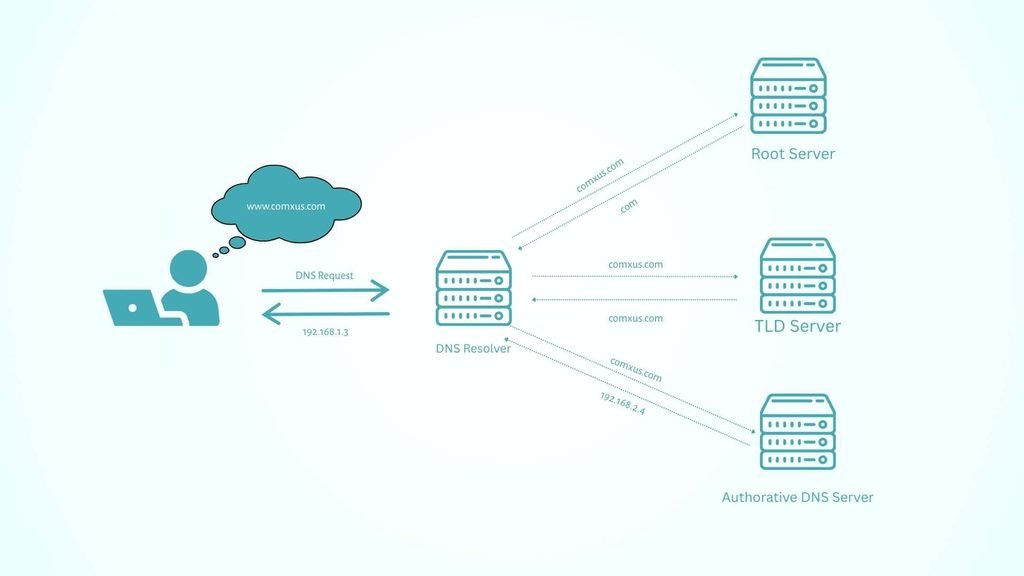
How Does DNS Work?
A DNS lookup usually involves several steps. Let’s understand the process with an example.
Suppose you enter:
www.example.com
into your web browser.
Step 1: You Enter a Domain Name
The process begins when you type a domain name into your browser.
Your computer needs to determine which IP address belongs to that domain.
Before contacting an external DNS server, the operating system and browser may check their local DNS cache to see if the IP address is already known.
Step 2: DNS Resolver Receives the Request
If the required information is not available locally, the request is sent to a DNS resolver.
The DNS resolver is usually provided by your internet service provider, organization, router, or a public DNS service.
Its job is to find the correct IP address on behalf of your device.
Step 3: Resolver Queries a Root DNS Server
If the resolver does not already have the answer in its cache, it contacts a root DNS server.
Root servers do not normally provide the final IP address of the website. Instead, they direct the resolver toward the appropriate Top-Level Domain (TLD) server.
For example, for:
www.example.com
the relevant TLD is:
.com
Step 4: TLD Server Is Contacted
The resolver then contacts the .com TLD DNS server.
The TLD server knows which authoritative DNS servers are responsible for the example.com domain.
It directs the resolver to the appropriate authoritative DNS server.
Step 5: Authoritative DNS Server Provides the Answer
The resolver then contacts the authoritative DNS server for the domain.
This server contains the actual DNS records for the domain and can provide the requested IP address.
For example:
www.example.com → 203.0.113.10
The resolver sends this information back to your computer.
Step 6: Browser Connects to the Server
Once the browser knows the IP address, it can establish a network connection with the destination server.
For an HTTPS website, this also involves establishing a secure TLS connection before the browser requests the webpage.
The entire DNS lookup process generally happens very quickly, often within milliseconds when the required information is already cached.
- Service discovery: DNS records can identify mail servers and other network services.
- Network management: Organizations can use internal DNS for servers, applications, and devices.
What Are the Different Types of DNS Servers?
DNS uses several types of servers to distribute and manage domain information.
1. DNS Resolver
A DNS resolver receives DNS requests from client devices and finds the required DNS information.
It may cache responses to speed up future requests.
2. Root DNS Server
Root DNS servers sit at the top of the DNS hierarchy.
They direct DNS resolvers toward the appropriate TLD servers.
3. TLD DNS Server
TLD servers manage information for domain extensions such as:
- .com
- .org
- .net
- .in
- .edu
They help identify the authoritative DNS servers responsible for specific domains.
4. Authoritative DNS Server
An authoritative DNS server stores the official DNS records for a domain.
It provides the final DNS answer for a domain lookup.
What Are DNS Records?
DNS records contain different types of information about a domain.
Some of the most common DNS records include:
A Record
An A record maps a domain name to an IPv4 address.
Example:
example.com → 192.0.2.10
AAAA Record
An AAAA record maps a domain name to an IPv6 address.
CNAME Record
A CNAME (Canonical Name) record creates an alias from one domain name to another.
For example:
www.example.com → example.com
MX Record
An MX (Mail Exchange) record identifies the mail server responsible for receiving email for a domain.
NS Record
An NS (Name Server) record identifies the authoritative DNS servers for a domain.
TXT Record
A TXT record stores text information associated with a domain. It is commonly used for email authentication technologies such as SPF, as well as domain verification.
What Is DNS Caching?
DNS caching helps improve performance.
When a DNS resolver receives an answer, it can temporarily store that information. If another user requests the same domain before the cached information expires, the resolver can provide the answer without performing the entire DNS lookup again.
The period for which a DNS record can remain cached is controlled by its TTL (Time to Live) value.
For example, if a DNS record has a TTL of 3600 seconds, it can generally be cached for up to one hour.
Caching reduces DNS traffic and improves response times.
Is DNS Secure?
Traditional DNS was not originally designed with strong encryption. Standard DNS queries can potentially be observed or manipulated by attackers under certain network conditions.
Modern technologies such as DNS over HTTPS (DoH) and DNS over TLS (DoT) can encrypt DNS queries between the client and DNS resolver.
DNS security is also important in enterprise networks because attackers can use techniques such as DNS spoofing, DNS cache poisoning, and DNS tunneling.
Organizations can improve DNS security through secure DNS services, monitoring, filtering, access controls, and proper network security practices.
DNS vs IP Address: What Is the Difference?
An IP address identifies a device or network endpoint, while DNS provides a system for translating human-readable names into network addresses and locating services.
For example:
Domain name: example.com
IPv4 address: 192.0.2.10
Users interact with the domain name, while network communication ultimately uses IP addressing.
Frequently Asked Questions About DNS
What does DNS stand for?
DNS stands for Domain Name System. It translates human-readable domain names into IP addresses and helps locate services across IP networks.
What happens when DNS is not working?
If DNS is unavailable or malfunctioning, devices may not be able to translate domain names into IP addresses. As a result, websites and other network services may become inaccessible by name, even when the underlying network connection is working.
Is DNS the same as a router?
No. A router forwards network traffic between networks, while DNS resolves names into network information. A router may provide DNS settings to client devices, but routing and DNS are separate functions.
How long does a DNS lookup take?
A DNS lookup can take only a few milliseconds when the response is cached. An uncached lookup may require communication with multiple DNS servers and can take longer.
Can DNS affect internet speed?
DNS can affect how quickly a connection starts because the browser may need to resolve a domain before connecting to the destination server. However, DNS generally does not determine the bandwidth or maximum speed of your internet connection.
