
Every network failure tells a story. Most stories start with a design decision. Sometimes the hardware & cables are fine. configurations also look correct.
Still, people encounter the network problems like- communication collapsed, devices not pinging.
Which happens due to the network topologies. Because, Network topology decides how devices talk to each other. It is responsible for controlling the traffic flow, redundancy, and fault isolation.
If topology is weak, no protocol can save the network. If topology is right, everything else becomes easier.
In this guide, we will break network topology down. Not as theory. But as a practical design tool.
By the end, you will see topology differently. Which will make you eligible design networks with more confidence.
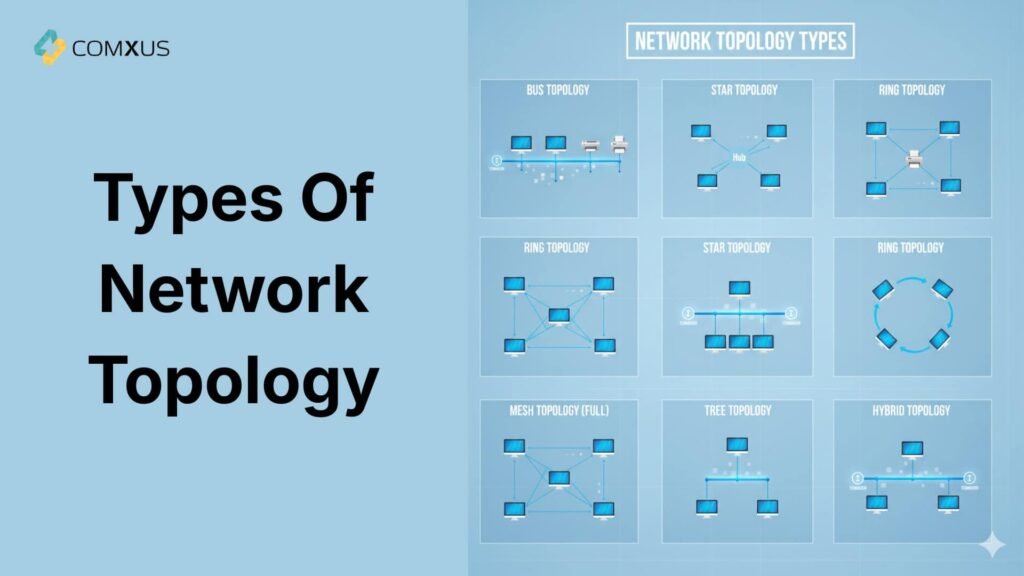
What Is Network Topology?
Network topology is the foundation of every network. It describes how network devices are arranged in the single network. It shows how nodes connect using physical or logical links. Now some of you might be confused about what is node and links?
Let me explain it for you.
When we talk about Nodes- It includes switches, routers, servers, and endpoint devices. Meanwhile, If I talk about Links, this includes ethernet or other wired/ wireless connection.
In simple language, Topology simply answers two basic questions:
- How devices are connected each other in a network.
- How data will flow between them.
This concept applies in every network. It doesn’t matter whether you are designing a network for small office or large industrial area.
What is Logical Vs Physical Topology?
When we talk about topologies, these two terms often confuse the engineers. They often get confused between logical & physical topology. But after reading this article, you will no longer be confused between them.
Physical Topology – Physical topology shows actual cable and device layout. It focuses on wiring paths and hardware placement. Think of racks, patch panels, and cable routes.
This view matters during installation and maintenance.
Logical Network Topology- Logical topology shows how data moves across the network. It ignores physical cable paths. VLANs, routing tables, and spanning trees define logical topology. Logical design impacts performance and security.
Now some of you might be thinking about which one is better?
Honestly speaking, both matters equally, while physically topology helps in easy installation and maintenance. On the other hand, logical topology helps you in performance and security.
So if you want a smooth network, you have to adapt both topology terms.
What are the types of network Topology?
Till now, we have understood about what is topology? Now it’s a time to learn about their variations, pros and cons of every topology.
Bus Topology –
This is a simple topology, which uses a single backbone cable. All devices connected in the network share the same communication line.
Bus topology requires less cables than other topology, also it doesn’t require a switch or router. So, it becomes a suitable choice for small offices where budget is really tight.
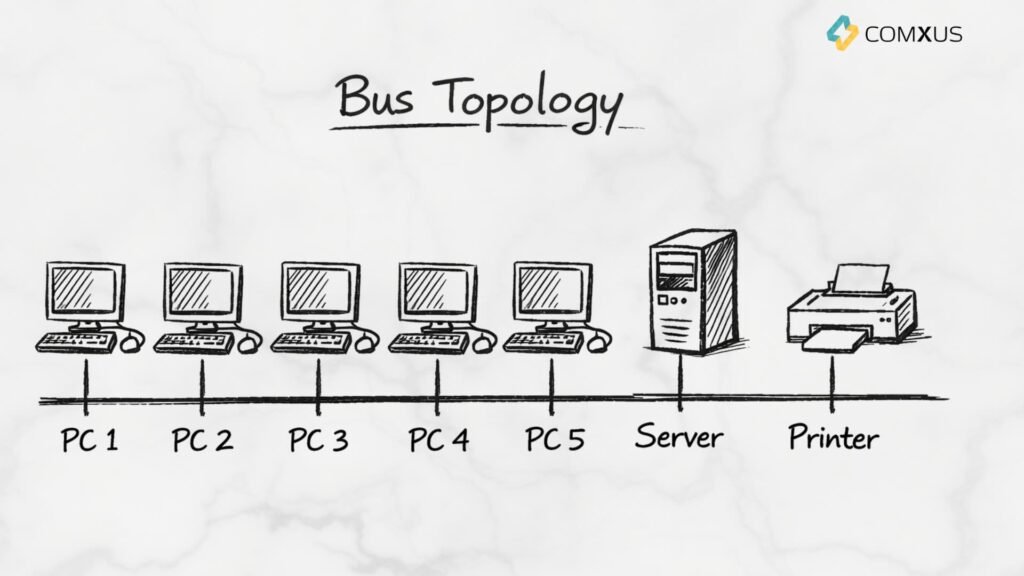
Although, this topology looks very simply an effective on paper, but in real life it creates lot of collisions and failures. I will say, this topology is suitable for small network or temporary network only.
Pros of Bus Topology –
- Simple physical design
- Low initial cost
- Easy to deploy for small networks
- Suitable for temporary networks
Cons Of Bus Topology –
- Single point of failure
- Poor fault isolation
- Limited scalability
- High collision rate
- Low performance under load
- Not suitable for modern networks
- Security limitations
Star Topology –
Star topology is the most common enterprise topology. It connects devices to the central switches of hub. Each device in this topology has an independent link.
So whenever cable faults, it affects only one device. Another device remains connected in the network. Meanwhile, if the central device (switch or hub) fails, entire network will be collapsed.
To reduce this risk, usually we use the redundant switches. Which takeover the network after primary switch’s failure.
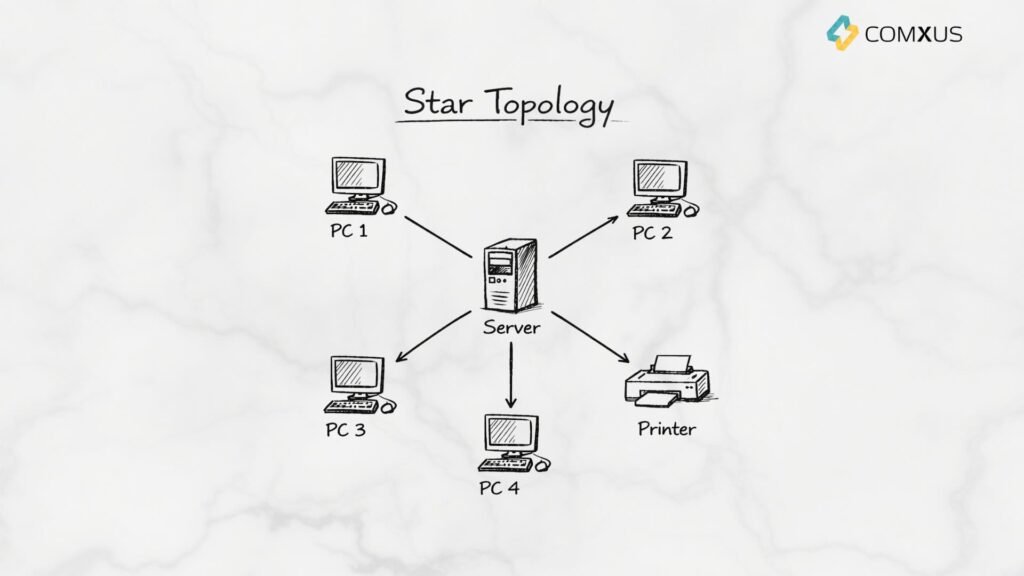
This type of topology is primarily being used in the modern office networks, surveillance system and enterprise networks.
Pros of star topology –
- Easy to design and understand
- Independent device connections
- Simple fault isolation
- Scalable network structure
- Better performance than bus topology
- Supports modern network technologies
cons of Star Topology –
- Single point of failure at the centre
- Higher cabling cost
- Limited by switch capacity
- Dependency on active components
- Not ideal for long-distance layouts
Ring Topology
Ring topology is another popular networking topology used in surveillance network. It connects devices in a closed loop. In this topology, each node passes data to the next.
It provides token-based communication process. Through, which data flows in single or both directions.
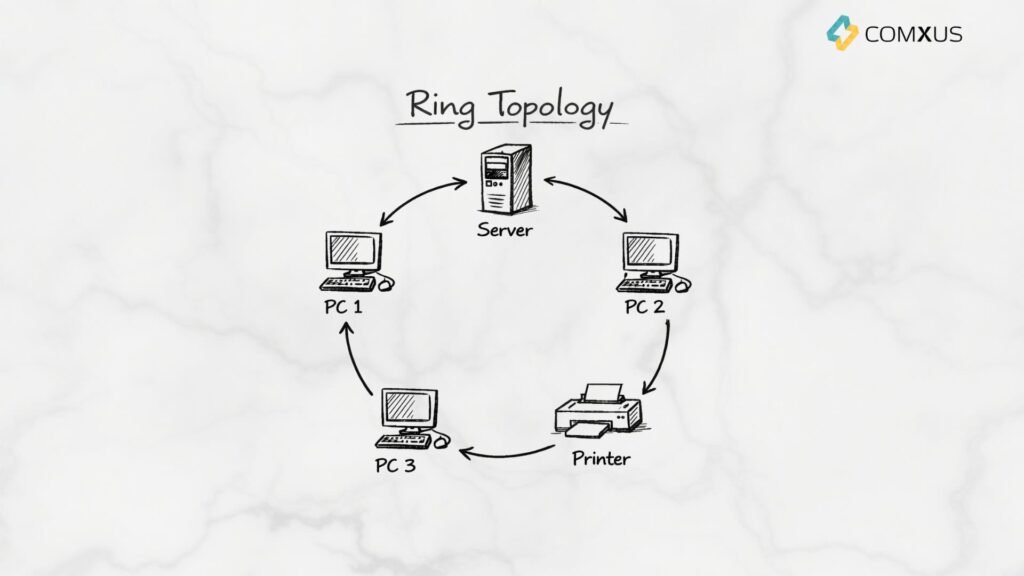
But you have to keep in mind, when you use the single ring, your network will collapse if a device will be disconnected from the network. To avoid this, people use dual ring topology. Where one ring is used for redundancy.
Pros of Ring Topology-
- Predictable data flow
- No data collisions in token-based rings
- Consistent performance under load
- Equal access for all nodes
- Well suited for deterministic networks
- Supports redundancy with modern designs
Cons Of Ring Topology-
- Single point of failure in basic designs
- Troubleshooting can be complex
- Adding or removing nodes can disrupt the network
- Higher configuration complexity
- Limited flexibility compared to star topology
Mesh Topology –
Mesh topology provides multiple paths between nodes. It can be full mesh or partial mesh. Full mesh offers maximum redundancy. It also increases cost and complexity. Meanwhile, Partial mesh balances resilience and cost. It is common in core networks.
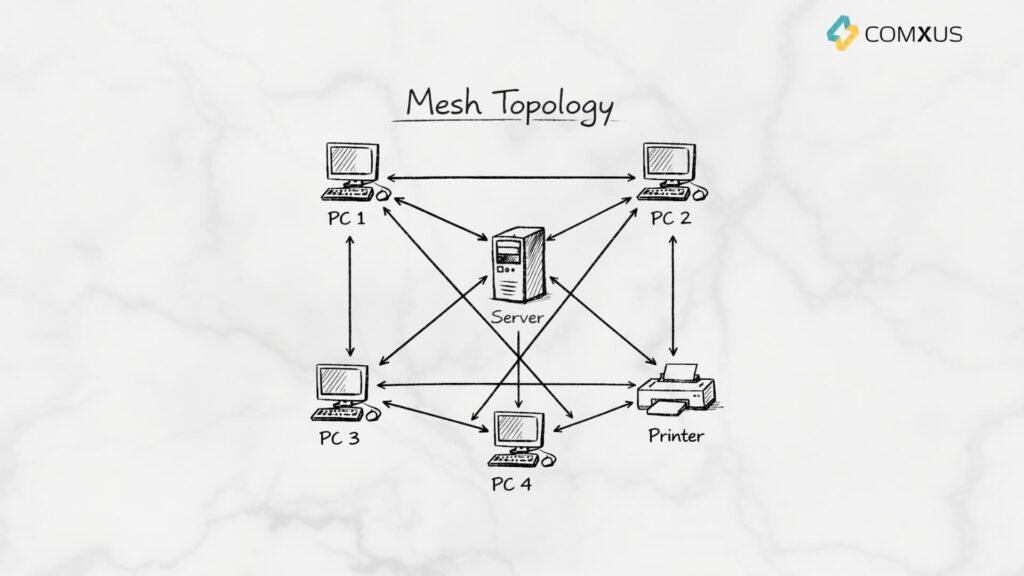
This topology is generally being used in WAN & Data Centres.
Pros of Mesh Topology –
- High reliability and redundancy
- No single point of failure
- Excellent fault tolerance
- High performance for critical traffic
- Strong support for mission-critical networks
- Better load distribution
- Enhanced security control
Cons Of Network Topologies-
- High deployment cost
- Complex design and planning
- Difficult to scale in full mesh
- Higher configuration overhead.
- Challenging troubleshooting
- Not suitable for access networks
Tree Topology-
Tree topology is the combination of bus and star topology. It follows hierarchical design. In tree topology, Access switches connect to distribution switches. Distribution connects to core switches. This design supports large networks. It also simplifies management and expansion.
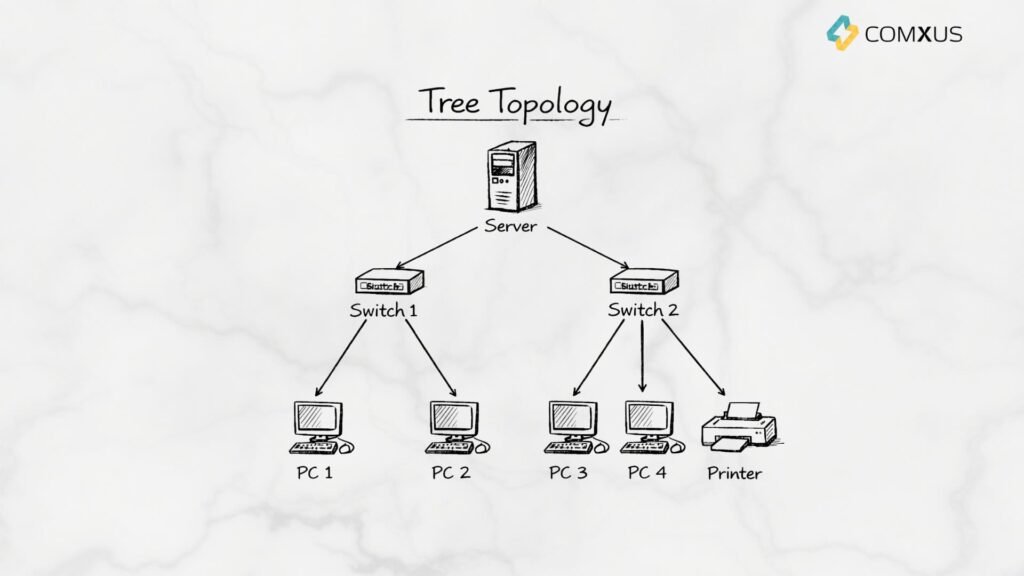
Now some of you might be wondering about, where is this topology is being used?
It is generally useful for large buildings and campuses.
Pros of tree topology-
- Hierarchical network structure
- Highly scalable design
- Simplified network management
- Efficient fault isolation
- Suitable for large networks
- Supports structured cabling standards
- Better traffic control
- Works well with VLANs and routing
Cons Of Tree Topology –
- Dependency on higher-level devices
- Complex initial design
- Higher infrastructure cost
- Potential bottlenecks at aggregation points
- Maintenance requires skilled engineers
Hybrid Topology
Hybrid topology mixes multiple topology types. Most real networks are hybrid. For example, access uses star topology. Core uses mesh topology.
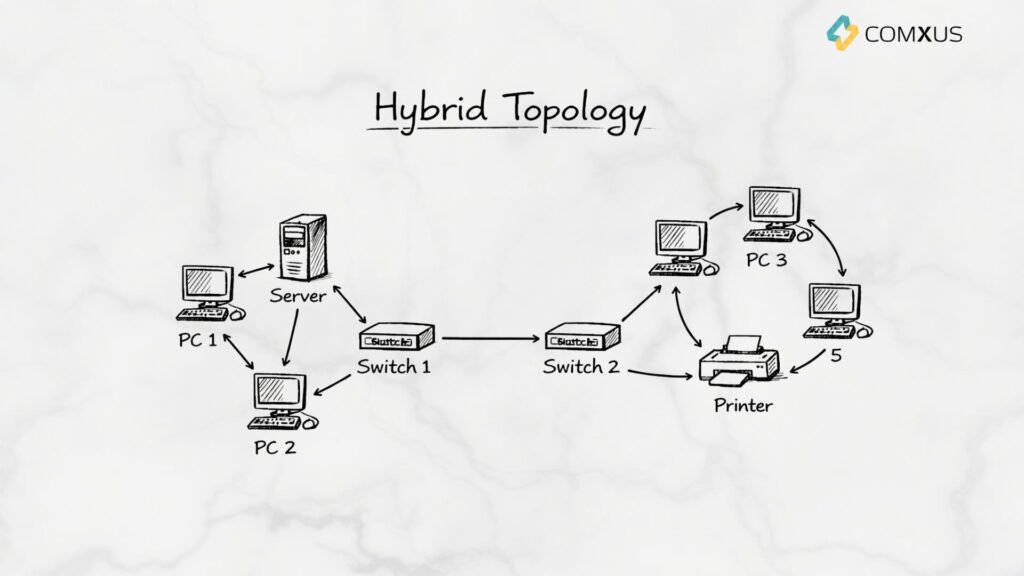
Hybrid designs provide flexibility. They also match real business needs.
Pros of Hybrid Topology-
- High design flexibility
- Optimized performance across network layers
- Scalable for growing networks
- Better fault isolation
- Supports complex enterprise requirements
- Improved reliability with proper design
- Aligns with real-world deployments
Disadvantages of Hybrid Topology
- Higher design complexity
- Increased deployment cost
- Complex troubleshooting
- Requires skilled network engineers
- Documentation becomes critical
- Configuration consistency challenges
Why Network Topology Matters in Real Projects
After reading about all types of topologies, you must have understood one thing. Topology is not a textbook concept. It directly affects daily operations. Here is why engineers should care.
- It impacts network performance and latency
- It defines fault tolerance and redundancy
- It controls scalability and future expansion
- It influences troubleshooting complexity
- It affects network security boundarie.
Specially, when we talk about industrial or surveillance networks, topology becomes critical. One wrong design can stop operations.
